pyspark theory
pyspark
architecture
Components:
- Driver
- DAG Scheduler → decides what stages need to run. Kicks in when an action is called.
- Task Scheduler → decides where/how to launch the tasks on available executor slots
- Block Manager → Every executor has one. It manages data blocks on executors
- Cluster manager -> managing the physical resources of the Spark cluster - cpu, ram etc
- Executors (one per node on databricks)
- Task threads - actually executes the tasks
Cluster manager
A Cluster Manager is responsible for managing the resources of the Spark cluster.
It decides where Spark applications get CPU and memory resources and launches executors on those resources.
The important distinction is:
Cluster Manager manages resources; Spark's Task Scheduler decides which Spark tasks run on those resources.
Available options - Standalone - Databricks - YARN (common in hadoop enviornments) - K8s
Driver
Has 3 components:
DAG Scheduler → decides what stages need to run. Kicks in when an action is called. Task Scheduler → decides where/how to launch the tasks on available executor slots Block Manager → Every executor has one. It manages data blocks on executors
Hosts SparkContext / SparkSession
Takes care of:
- Connecting to the cluster
- Creating RDDs
- Scheduling jobs
- Communicating with executors
- Managing Spark configuration
- Coordinating execution
SparkContext and SparkSession are both entry points into Apache Spark, but they operate at different levels.
- SparkContext is the lower-level entry point. It establishes the connection between a Spark application and the Spark cluster and is responsible for coordinating execution with the cluster manager and executors. It was originally the main entry point for working with RDDs.
- SparkSession is the higher-level, unified entry point introduced in Spark 2.0. It is primarily used for working with DataFrames, Spark SQL, and other higher-level Spark APIs. A SparkSession internally provides access to the underlying SparkContext.
Why? SparkContext only dealt with RDDs Later on when Spark SQL and dataframes were introduced, instead of making a separate entry point for all 3, a unified SparkSession entry point was made
Executor
An executor is a process running on a worker node that executes Spark tasks for an application. It has multiple execution slots determined largely by spark.executor.cores, a Block Manager responsible for managing data blocks, and memory consisting primarily of JVM heap plus potentially off-heap memory. Executors are normally long-lived for the duration of the Spark application.
Lives for the lifetime of the application
Concurrency note - Suppose executor has 4 cpus even if 100 tasks are lined up concurrently, only 4 tasks will be executed at a time - 1 per core. Rest will be queued up.
Executors (one per node, persist for app lifetime) └── Task Threads — run tasks in parallel (= spark.executor.cores) └── Block Manager — stores cached partitions, shuffle data └── JVM heap + off-heap
Job, Stage, Task
Action (collect, write)
  └── Job
        └── Stage 1 (narrow transforms — no shuffle)
              └── Task per partition — runs on one executor core
        └── shuffle boundary
        └── Stage 2
              └── Task per partition
- 1 job per action.
- Stage boundary = shuffle (wide transform).
- 1 task = 1 partition = 1 core for its duration.
- All tasks in a stage run in parallel (up to available cores).
Driver
- Runs your
main()— all DataFrame/RDD transformations build a logical plan here. - DAG Scheduler converts logical plan → physical stages.
- Task Scheduler sends tasks to executor slots.
- Collects results of
collect()/take()— large collects OOM the driver. - Single point of failure — if driver dies, job dies.
spark.driver.memory— default 1g. Increase if collecting data or large broadcast.
Executor
- JVM process on a worker node.
- Slots =
spark.executor.cores(default 1 on YARN, typically set to 4–5). - Each slot runs one task at a time.
- Shares memory across all slots on that executor (unified memory model).
- Shuffle data written to local disk, fetched by next stage's executors over network.
- Cached partitions stored in executor memory or disk per storage level.
Memory per executor (recap)
Container = heap + overhead + off-heap

Heap (spark.executor.memory)
  └── Reserved:   300 MB fixed
  └── User:       40% of (heap − 300MB) — UDFs, user objects
  └── Unified:    60% of (heap − 300MB)
        └── Execution: shuffle, sort, join buffers  ← can evict storage
        └── Storage:   cache, broadcast             ← cannot evict execution
Shuffle
- Triggered by wide transforms:
groupBy,join,distinct,repartition,orderBy. - Map side: each task writes shuffle files partitioned by hash of key → local disk.
- Reduce side: tasks fetch their partition from every map task over network.
- Expensive: disk write + network transfer + disk read.
- AQE coalesces small post-shuffle partitions automatically.
spark.sql.shuffle.partitions= 200 default. Too high → tiny tasks. Too low → OOM.
DAG Scheduler vs Task Scheduler
| - | DAG Scheduler | Task Scheduler |
|---|---|---|
| Input | RDD/DF lineage | Stages from DAG scheduler |
| Output | Stages + task sets | Tasks assigned to executors |
| Knows about | Dependencies, shuffle boundaries | Executor slots, locality |
| Failure handling | Resubmits failed stages | Retries individual tasks |
Data locality
Spark tries to run tasks where data lives — avoids network transfer.
Priority: PROCESS_LOCAL → NODE_LOCAL → RACK_LOCAL → ANY.
Waits spark.locality.wait (default 3s) before falling back to next level.
Cluster managers
| Manager | Notes |
|---|---|
| Standalone | Spark's built-in, simple, no other deps |
| YARN | Hadoop ecosystem, shares cluster with other jobs |
| Kubernetes | Container-native, dynamic scaling, no persistent workers |
| Databricks | Managed, autoscaling, driver/worker on VMs or containers |
Deploy modes
client— driver runs on the machine that submitted the job. Logs visible locally. Used for interactive/notebooks.cluster— driver runs inside the cluster. Job survives client disconnect. Used for production.
Gotchas
- Driver is single-threaded for scheduling — very many tiny tasks → driver bottleneck.
collect()pulls all data to driver — OOM if large. Usewriteinstead.- More cores per executor = better memory sharing but more GC pressure. Sweet spot: 4–5 cores.
- More executors with fewer cores = better parallelism for shuffle-heavy jobs.
spark.sql.shuffle.partitionsis the most-tuned config — set to 2–3× total cores.- Executor lost = tasks retry (up to
spark.task.maxFailures= 4). Stage reruns from shuffle files if available. - Speculative execution (
spark.speculation = true) launches duplicate slow tasks — useful for stragglers.
Executor memory organization
https://luminousmen.com/post/dive-into-spark-memory/
- JVM heap
- Reserved Memory — internal system operations and JVM overhead.
- Unified Memory — Shared pool containing Execution + Storage Memory, allowing them to borrow from each other.
- Execution Memory — computation for joins, aggregations, sorting, and shuffles.
- Storage Memory — cached/persisted DataFrames/RDDs and broadcast variables.
- User memory - udfs, python wrappers, ml libs,
- Off-Heap Memory — part of project tungsten. Entirely bypasses the gc. Memory allocated outside the JVM heap, used when Spark off-heap memory is enabled.
Execution memory takes priority. Execution can take from storage. Storage can't take from execution.
reserved = 300mb unified = 0.6 of remaining user = 1 - 0.6 = 0.4 of remaining
Container = heap (spark.executor.memory) + overhead (max(384MB, 0.1×heap)) + off-heap + pyspark memory.
Heap split:
- Reserved: 300 MB fixed.
- Usable = heap − 300 MB.
- Unified = 0.6 × usable (spark.memory.fraction).
- User memory = 0.4 × usable — UDF objects, user data structures.
Unified split (spark.memory.storageFraction = 0.5):
- Execution: shuffle, join, sort, aggregation buffers.
- Storage: cached blocks, broadcast.
- Execution can evict storage down to storageFraction. Storage can never evict execution.
Overhead holds: python workers, netty shuffle buffers, off-heap allocations. OOM in PySpark UDFs → raise overhead, not heap.
2.2 Narrow vs wide transformations
| Narrow | Wide |
|---|---|
| 1 parent partition → 1 child | many→many, shuffle |
| map, filter, select, union, coalesce, mapPartitions | groupByKey, reduceByKey, join, distinct, repartition, orderBy, window |
| pipelined in one stage | creates stage boundary |
Shuffle = write map-side files to disk → fetch over network. Stage count = shuffles + 1. reduceByKey > groupByKey (map-side combine).
2.3 Lazy evaluation
Transformations build a DAG only. Actions trigger execution: collect, count, show, take, first, write, foreach, toPandas.
Why: lets Catalyst reorder/prune (predicate pushdown, column pruning, constant folding), pipeline narrow ops, pick join strategy at runtime (AQE).
Flow: unresolved plan → analyzed → optimized (Catalyst) → physical plans + cost → RDD DAG (Tungsten codegen).
Nothing is executed until an action is found And when an action is found, the dag is always executed from the start. Unless there is a checkpoint, cache, persist.
2.4 Storage levels
MEMORY_ONLY · MEMORY_AND_DISK · MEMORY_ONLY_SER · MEMORY_AND_DISK_SER · DISK_ONLY · *_2 (replicated) · OFF_HEAP
- RDD
cache()= MEMORY_ONLY. DataFramecache()= MEMORY_AND_DISK. - SER = less memory, more CPU. In PySpark data is already serialized, so SER levels are a no-op distinction on the JVM side.
2.5 cache vs persist
cache()=persist()with default level. No argument.persist(level)= explicit StorageLevel.- Both lazy → materialized on the first action.
unpersist()is eager. Always unpersist; cached blocks compete with execution memory.- Cache only when reused ≥2 times AND recompute is expensive.
2.6 Write modes
append · overwrite · error / errorifexists (default) · ignore
Dynamic partition overwrite: spark.sql.sources.partitionOverwriteMode=dynamic → replaces only touched partitions.
2.7 Read modes
PERMISSIVE(default): bad rows → nulls, raw row into_corrupt_record(must be in schema).DROPMALFORMED: silently drops.FAILFAST: throws. Always supply an explicit schema in production — inference triggers an extra job and is unstable.
2.8 Streaming triggers
| Trigger | Behaviour |
|---|---|
| default (unspecified) | next micro-batch as soon as previous ends |
processingTime="30 seconds" |
fixed interval; skips if overrunning |
availableNow=True |
process all available data in multiple batches, then stop (replaces once) |
continuous="1 second" |
~1 ms latency, at-least-once, limited ops |
- default
- next micro-batch as soon as previous ends
- once
- .trigger(once=True)
- process all available data and stop
- available now
- .trigger(availableNow=True)
- similar to once. processes in micro batches until it catches up
- processing time (interval)
- .trigger(processingTime="10 seconds")
- run query every fixed interval
- finish early? pause until next trigger. Finish late? start next one immediately
- continuous
- low latency, sub-second
- interval defines how often commits are done (not batch size)
- .trigger(continuous="1 second")
Checkpoint location is mandatory for fault tolerance (offsets + commits + state).
cache vs persist
- cache - default storage level only
- rdd - MEMORY_ONLY
- dataset - MEMORY_AND_DISK
- persist
dim_sales_df.persist(StorageLevel.DISK_ONLY)
unit of parallelization
file query parquet file? row group
plan phases
Catalyst optimizer
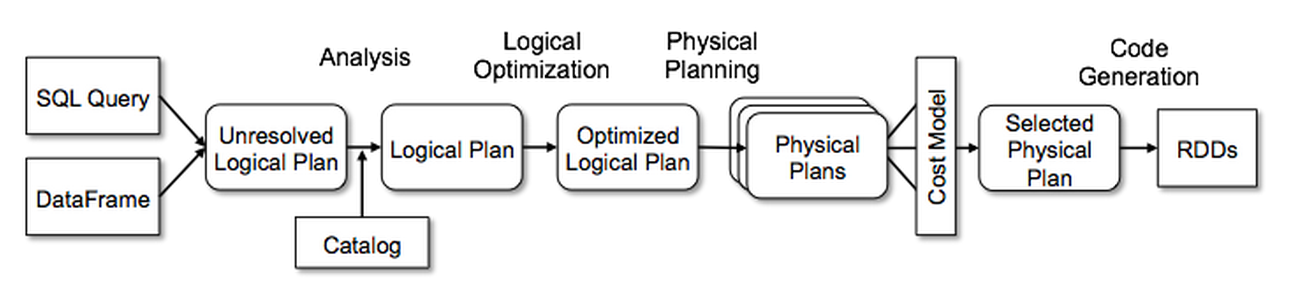
- input query
- analysis phase
- unresolved logical plan
- logical plan (using catalog)
- optimized logical plan
- physical planning
- physical plan
- code geenration
- select best physical plan using cost model
- generate code rdd
Spark SQL optimization engine.
Know the phases:
- Analysis
- Logical optimization
- Physical planning
- Code generation
joins
join types
- inner - default
- left
- right
- full
- cross
- left_semi (rows of left only that match)
- left_anti
Join Hints
- BROADCAST
- MERGE - shuffle sort merge - default when not (1)
- SHUFFLE_HASH (spark uses smaller side as the build side)
- SHUFFLE_REPLICATE_NL - shuffle and replicate nested loop join
df - products_df.join(
customers_df.hint("BROADCAST"),
products.customer_id == customers.customer_id,
"inner"
)
5. L3 System Design
5.1 Answer framework
Requirements → scale numbers → sources → ingestion → storage/layers → modelling → serving → quality/governance → ops → tradeoffs. Always state: batch vs streaming, latency SLA, volume/day, retention, consumers.
5.2 Analytics system for a food delivery company
Requirements - Functional: real-time ops dashboards (live orders, rider ETA, kitchen prep time), business analytics (GMV, AOV, cohorts, funnel), restaurant-facing reports, ML features (ETA, recommendations, surge). - Non-functional: <1 min for ops metrics, hourly/daily for BI, 99.9% uptime, replayable, GDPR delete. - Scale example: 10M orders/day ≈ 120 orders/s peak 5×; 50+ events/order → ~50k events/s; ~2 TB/day raw.
Sources: app clickstream, order service DB (CDC via Debezium), rider GPS pings, payments, restaurant POS, support tickets, third-party (maps, weather).
Ingestion: Kafka as the single bus, topic per domain, Avro/Protobuf + schema registry, partition by order_id for ordering. CDC for OLTP tables. Object store landing for batch/file sources.
Processing: Structured Streaming / Flink for real-time (dedupe by event_id, watermark for late GPS, stateful joins order↔rider). Spark batch for daily reprocessing. Kappa preferred — one code path, replay from Kafka.
Storage — medallion - Bronze: raw append-only Delta, partition by ingest date, keep everything. - Silver: cleaned, deduped, conformed, SCD2 for restaurant/menu. - Gold: star schemas + pre-aggregates per consumer.
Serving - Real-time ops: Druid/Pinot/ClickHouse (sub-second on live events). - BI: warehouse/lakehouse SQL warehouse + BI tool, gold aggregates. - ML: feature store, offline (Delta) + online (Redis) with the same definitions. - APIs for restaurant partner dashboards.
Model (gold)
- fact_order grain = one order; fact_order_item grain = one item; fact_delivery_event grain = one status transition.
- Dims: date, time, customer, restaurant (SCD2), menu_item, rider, city/zone, payment_method, promotion.
- Metrics: GMV, AOV, cancel rate, delivery time p50/p95, rider utilisation, kitchen prep time.
Cross-cutting: idempotent writes + exactly-once via checkpoints; data quality (expectations, freshness/volume/null checks); lineage via UC; PII tokenised, masked columns; cost (partition + Z-order/liquid clustering, tiered retention); backfill strategy; monitoring with SLAs and alerts.
5.3 Warehouse schema for customer purchases (retail)
Grain first: one row per line item per transaction. State it before anything else.
Fact — fact_sales_line
Keys: date_key, time_key, customer_key, product_key, store_key, promotion_key, employee_key, payment_key
Degenerate: transaction_id, line_number
Measures (additive): quantity, gross_amount, discount_amount, net_amount, tax_amount, cost_amount, margin_amount
Dimensions
- dim_date — smart integer key, fiscal + calendar attributes, holiday flags.
- dim_customer — SCD2 (address, segment, loyalty tier), natural key + surrogate key, is_current, valid_from/to.
- dim_product — SCD2, hierarchy: item → subcategory → category → department; brand, supplier.
- dim_store — region hierarchy, SCD2 for remodels/relocations.
- dim_promotion — campaign, type, discount mechanics.
- Conformed dims shared with returns, inventory, e-commerce facts.
Other facts
- fact_inventory_snapshot — periodic snapshot, grain = product × store × day (semi-additive: no summing across dates).
- fact_returns — same dims, negative measures or separate fact.
- fact_order_lifecycle — accumulating snapshot with milestone dates (ordered/picked/shipped/delivered).
Design points
- Star over snowflake for BI performance; snowflake only for very large sparse dims.
- Surrogate integer keys; never expose business keys in facts.
- Handle unknown/late-arriving dims with a -1 "Unknown" member; inferred members for late dimensions.
- SCD types: 1 overwrite, 2 new row (default for history), 3 prior-value column, 6 hybrid.
- Bridge table for many-to-many (e.g. multiple loyalty accounts per household).
- Physical: partition fact by date, cluster/Z-order by (store_key, product_key), no partition on high-cardinality keys.
- Loading: MERGE on natural key + effective date; idempotent daily runs; late-arriving facts reprocess affected partitions.
kafka
7 columns you get with a message
| Column | Type | Notes |
|---|---|---|
key |
binary | cast to STRING if text key |
value |
binary | your payload — always cast/parse |
topic |
string | useful when subscribing to multiple |
partition |
int | |
offset |
long | |
timestamp |
timestamp | producer or broker timestamp |
timestampType |
int | 0=CreateTime, 1=LogAppendTime |
peformance optimization techniques
execution - use cache or persist sql - parallelize query using predicates
shuffles - use bucketing
oom - reduce data using predicate pushdown or projection pruning